Showing posts with label 3D model. Show all posts

Monday, 7 November 2016

Top 10 Benefits of 3D Printing

1. Time-to-Market: 3D printing allows ideas to develop faster than ever. Being able to 3D print a concept the same day it was designed shrinks a development process from what might have been months to a matter of days, helping companies stay one step ahead of the competition.
2. Save Money: Prototyping injection mold tools and production runs are expensive investments. The 3D printing process allows the creation of parts and/or tools through additive manufacturing at rates much lower than traditional machining.
3. Mitigate Risk: Being able to verify a design before investing in an expensive molding tool is worth its weight in 3D printed plastic, and then some. Printing a production-ready prototype builds confidence before making these large investments. It is far cheaper to 3D print a test prototype then to redesign or alter an existing mold.
4. Clear Communication: Describing the product you are going to deliver is often misinterpreted since it leaves construction up to the imagination. A conceptual picture of the product is better than the description since it is worth 1,000 words, but getting to hold the tangible product-to-be, in hand, clears all lines of communication. There is no ambiguity when holding the exact, or at least a very close, representation of the product.
5. Feedback: With a prototype you can test the market by unveiling it at a trade-show, showing it to potential buyers or investors, or raising capital by pre-selling on Indiegogo or Kickstarter. Getting buyers response to the product before it actually goes into production is a valuable way to verify the product has market potential.
6. Get the Feel: One thing you can’t get from a picture or virtual prototype on the computer screen is the way something feels in your hand. If you want to ensure the ergonomics and fit of a product are just right, you must actually hold it, use it and test it.
7. Personalize It: With standard mass-production, all parts come off the assembly line or out of the mold the same. With 3D printing, one can personalize, customize and tweak a part to uniquely fit their needs, which allows for custom fits in the medical and dental industries and helps set people apart in the fashion and jewelry world.
8. Build your Imagination: In the modern boom of digital art and design, the possibilities are not only accelerating but limitless. One can now 3D print almost anything they imagine after drawing it up virtually. In a relatively short time, an idea, concept, dream or invention can go from a simple thought to a produced part that you can hold.
9. Square Holes?… No Problem: The limitations of standard machining have constrained product design for years. With the improvements in additive manufacturing, now the possibilities are endless. Geometry that has been historically difficult or impossible to build; like holes that change direction, unrealistic overhangs, or square interior cavities, is now possible and actually simple to construct.
10. Fail Fast, Fail Cheap: Being able to test ideas quickly and discover what doesn’t work accelerates discovery leading to an ideal solution. 3D printing allows a product developer to make breakthroughs at early stages that are relatively inexpensive leading to better products and less expensive dead-ends.
For more information on 3D printing call us today 
www.3dinnovation.co.nz

Road front showroom:
74c Maleme Street
Greerton
Tauranga 3112
New Zealand

Ph: 07 929 7278
info@3dinnovation.co.nz


Tuesday, 11 October 2016

10 free 3D printing software downloads

3D print models are typically distributed in a file format called STL. 3D printer slicer software is needed to convert an STL file into G-code, language which can be understood by a 3D printer. It’s called a slicer because that’s literally what it does; it chops up the 3D model into thousands of flat 2D layers that the 3D printer can fabricate as a physical object.
Cura is the standard slicer software for all Ultimaker 3D printers, but it can also be used with most other 3D printers, including RepRap, Makerbot, Printrbot, Lulzbot, and Witbox. It’s fully open source and can be extended via a plugin system.

This 3D printing software is very easy to use and allows you to manage the most important 3D print settings in a clear interface. Start in “Basic” mode for rapid onboarding, where you can choose reconfigured printer quality settings. When you need more precise control over the print quality settings, switch to over “Expert” mode.
You can also use Cura as 3D printer host software for direct control over your machine, but the 3D printer needs to be connected to the PC for the duration.

10 free 3D printing software downloads # 1  Cura
10 free 3D printing software downloads # 2 Craftware
10 free 3D printing software downloads # 3 1233D
10 free 3D printing software downloads # 4 3dslash
10 free 3D printing software downloads # 5 Tinkercad
10 free 3D printing software downloads # 5 3Dtin
10 free 3D printing software downloads # 6 sculptris
10 free 3D printing software downloads # 7 viewstl
10 free 3D printing software downloads # 8 repetier
10 free 3D printing software downloads # 9 FreeCad
10 free 3D printing software downloads # 10 sketchup

For information on 3D printing see 3Designs details below 

Contact Details
Technical Director
email: design@3dinnovation.co.nz

Managing Director
email: robert@3dinnovation.co.nz

Showroom hours: Monday to Friday, 8.30am-5.00pm 

Open weekends by appointment only. 

Road front showroom:
74c Maleme Street
Greerton 
Tauranga 3112
New Zealand

Ph: 07 929 7278 
info@3dinnovation.co.nz


Wednesday, 11 May 2016

What is rapid prototyping

What is rapid prototyping? 


Rapid Prototyping (RP) can be defined as a group of techniques used to quickly fabricate a scale model of a part or assembly using three-dimensional computer aided design (CAD) data. What is commonly considered to be the first RP technique, Stereolithography, was developed by 3D Systems of Valencia, CA, USA. The company was founded in 1986, and since then, a number of different RP techniques have become available

Rapid prototyping

Rapid Prototyping has also been referred to as solid free-form manufacturing, computer automated manufacturing, and layered manufacturing. RP has obvious use as a vehicle for visualization. In addition, RP models can be used for testing, such as when an airfoil shape is put into a wind tunnel. RP models can be used to create male models for tooling, such as silicone rubber molds and investment casts. In some cases, the RP part can be the final part, but typically the RP material is not strong or accurate enough. When the RP material is suitable, highly convoluted shapes (including parts nested within parts) can be produced because of the nature of RP.


FDM (Fused deposit modelling)


Rapid Prototyping

FDM is an additives' manufacturing process where plastic filament is heated and extruded through a nozzle. This extruded plastic is precisely placed layer upon layer to create a 3 dimensional model. With a large amount of materials available such as ABS, PLA, polycarbonate, polyamides, polystyrene, lignin, among many others, there are different trade-offs between strength and temperature properties.

Prototyping with materials like PLA can be used for lost-wax (investment) castings. Reducing mould manufacturing time by creating accurate models with the tree assembly in one process, removing the need to create individual art moulds getting your product to the market quicker with reduced cost. PLA is rigid and aesthetically smooth making it great for small end parts and prototype components that must not flex.

ABS plastic has great strength and flexibility for creating working prototypes. It has good impact strength and is dimensionally very accurate.


SLA (Stereolithography)


Rapid Prototyping

SLA is a rapid prototyping process that uses a vat of liquid UV-curable photopolymer resin and a UV laser to build parts one layer at a time. SLA rapid prototyping is a great process for concept models, master patterns and tradeshow models.

Maximum dimensions available: 635mm x 635mm x 533mm


SLS (Selective laser sintering)


Rapid Prototyping

A rapid prototyping process that uses a high power laser to fuse small particles of powder to build parts one layer at a time. SLS rapid prototyping is a great process for functional testing and for low volume manufacturing.

SLS is ideal for durable, functional parts with a variety of applications. SLS is capable of producing snap fits and living hinges.

Maximum dimension available: 711mm x 482mm x 482mm.


CNC milling

Rapid Prototyping

Subtractive modelling uses CNC machines to remove material to achieve a 3 dimensional part. This process can be used for both prototyping and end part manufacture. Items can be produced in almost any material making the parts suitable for real life applications including product validations and testing. This process is more suited to the final design stages as manufacture can be expensive.


Colour InkJet printing


Rapid Prototyping

Colour InkJet Printing (CJP) is an additive manufacturing technology which involves two major components – core and binder. The Core™ material is spread in thin layers over the build platform with a roller. After each layer is spread, colour binder is selectively jetted from inkjet print heads over the core layer, which causes the core to solidify. The build platform lowers with every subsequent layer which is spread and printed, resulting in a full-colour three-dimensional model.

Whether printed with colour or in standard white, parts can be additionally clear coated to add a hard smooth coating or wax coated to smooth out the surface finish.

Maximum dimensions available: 381mm x 304mm x 254mm


for information on 3dprinting see our website 

Tuesday, 10 May 2016

10 Things You Need To Know Before Buying A 3D Printer

10 Things You Need To Know Before Buying A 3D Printer


So you have decided to buy yourself a 3D printer after hearing about the amazing things it can build. You want to get started on printing models of your own a custom phone case, cosplay materials, figurines, musical instruments – the possibilities are endless. Hold your horses, there are a few things you need to know before diving into the world of 3D printing
There are a lot of 3D printers on the market today that have varying specifications, which in turn cater to different demands. On top of that, there are technicalities about 3D printing that you really should look into. To help you decide on which printer to make your first, we have complied a list of 10 things you need to know before you buy a 3D printer.


1. Types of 3D printers

3D printing is a broad term that covers the technologies required for producing physical materials. The one you probably heard of in the media and the most popular among hobbyists is the one that uses Fused Deposition Modeling (FDM).


Fused Deposition Modeling (FDM)


FDM is an additive process, where a model is created by heating and extruding plastic, pieced together layer by layer. Most of the 3D printers referred in this post works on FDM, as they are more widely available and easy to find. There are 2 other types of 3D printing available: Stereolithography and Selective Laser Sintering (SLS). They are much more expensive compared to FDM.

Stereolithography

Stereolithography also uses the additive process but instead of extruding plastics, the process utilizes an ultraviolet light beam to harden a model from a pool of photosensitive liquid. This allows for a higher quality printout.


Selective Laser Sintering (SLS)


SLS is similar to stereolithography, except that the process involves lasers and powders instead of UV light beams and liquid. A laser is used to melt the powder, creating a layer of the printed material. This allows some models to print metal objects, which is not possible in the other two processes.


2. Build Your Own Or Buy One


The 3D printing community is one made of creators and makers, so it makes sense that many people would like to try their hand in building a 3D printer on their own. There are building instructions and 3D printer kits available online if you decide to go with this route.

Building your own printer can be cheaper than buying one but if you don’t have the time, you could always buy a pre-assembled printer. Your final decision will depend on whether you are interested in tinkering with the technology, or just want to start printing right away.


3. Price


One of the main factors that can help turn 3D printers mainstream is their market price. Prices depend mainly on the quality of the output. In general, the higher-quality ones tend to go above $1000; professional printers can even go above $2000, e.g. the MakerBot series. But if you are just dipping your toes in 3D printing, you can start with simple models that go for as low as $100.


4. Materials used to print


The two materials required for 3D printing are Poly Lactic Acid (PLA) and Acrylonitrile Butadiene Styrene (ABS). Both are thermoplastics that will becomesoft and malleable when heated, frozen when cooled. They are sold as 1kg (2.2lbs) spools of filament, priced in the $30 range.

Poly Lactic Acid (PLA)

PLA is a type of plastic that is derived from corn starch, excellent for beginners to start dabbling with. Also great for creating small, simple household items. Other characteristics include:
  • Biodegradable and environmentally sound
  • Cools quickly, which prevents problems with model warping
  • Available in both solid and translucent colors, gives printed objects a glossy look
  • Disadvantage: Its low melting point may cause models to deform under high heat
  • Disadvantage: It is difficult to work with if you require joints and interlocking parts

Acrylonitrile Butadiene Styrene (ABS)


ABS is a petroleum-based plastic that is a popular choice because of its strength and flexibility – think Lego bricks (which can be made using 3D printers, if you didn’t know).
  • Its flexibility makes creating interlocking pieces easier to create and work with.
  • It also has a higher melting point, so your creations will be less likely to deform under high heat.
  • Disadvantage: It takes longer to cool compared to PLA; models aresusceptible to warping.
  • Disadvantage: It emits fumes during printing (more on this below).

How To Choose


You need to know which material is suitable for your final product. From there you can choose which type of printer you should buy. It is important to know that not all printers can accept both materials – some will work with only either one type.

When it comes to filament size – 1.75mm or 3mm in diameter – it doesn’t factor much into the end quality. More popular printer brands go with 1.75mm so it is recommended that you start with that.

5. Safety


When it comes to 3D printing, there are a few safety issues to take note.

Playing With Heat

The most important thing to remember is that you are working with heated plastics. Extruders, plastics and in some printers, the print bed itself can get very hot and can cause bad burns if you are not careful. Some printers have no enclosure around the print area; practice extra caution with these printers. Beware Of Fumes It is important to keep your 3D printer in an well-ventilated room. During the printing process, expect fumes to be emitted, particularly when you use ABS plastics. These fumes are reported to be rather overwhelming although there is little to no research that states the impact they have on general health. Still, it is best to take the necessary precautions, particularly if you will be using 3D printers a lot.

6. Quality


To produce high quality 3D printed products, you need to take note of two things: print resolution and print speed.

Print resolution refers to the level of detail the printer can get, measured in microns – the smaller it is, the higher level of detail in the objects you can create. Print speed measures how fast the printer can move its extruder – the higher the print speed, the faster it will print. Note that other features may affect the print speed, such as the acceleration and deceleration of the printer, which helps prevent the printer from shaking.


7. Obtaining A 3D Model


When it comes to getting a 3D model, there are two routes: you can create it yourself or download a pre-made model blueprint from the Internet. If you intend to create your own model, there are a variety of software, both free and commercial, that will help you bring your creation into the real world. If you like, you can even learn 3D modeling.


8. STL Files


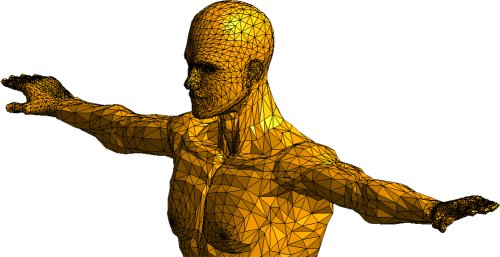
The STL file (STereoLithography) is the standard file format that you will use to print your 3D model into a physical object. The file can be generated using most CAD programs so if you are building your own 3D models, chances are the software you are using can output one. Basically inside an STL file is the information needed to produce a 3D model. The model itself is broken down to a series of triangles and a list of their XYZ coordinates is used by the printer to create the physical object, layer by layer. 


9. Slicing Software


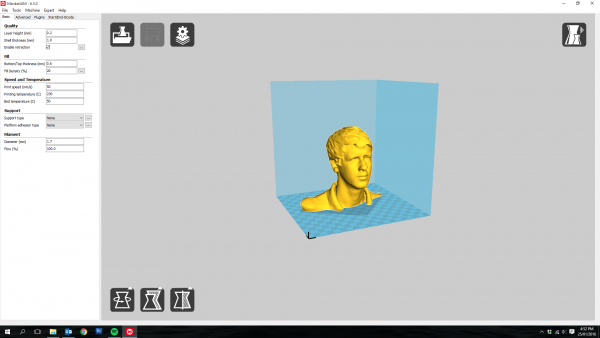
Once you have an STL file of the model you want to print, you will have to put them through a slicing software. What slicing does is that it “tells” your printer how to print your model. It provides instructions on the number of layers needed, the starting position of the printer and the parts of the model that should be solid or hollow. There are a number of software to help you with this although some software come with the printer. A good example would be MakerBot’s MakerWare. 


10. Community


The great thing about a new tech trend is that there is almost always an online community devoted to it. It is no different with 3D printers. Check online for a community of people who own a particular brand, to get more insight and answers to questions you may have about the ins and outs of that printer. If the community is small or worse, nonexistent, the lack of users should raise a red flag about that particular brand. All you need to make a sound investment is to read up more about that brand and its competitors so you know what you are getting into.

Blog from 3design New Zealand 

Contact Details

Technical Director email: design@3dinnovation.co.nz

Managing Director email: robert@3dinnovation.co.nz

Showroom hours: Monday to Friday 8.30am-5pm

Open weekends by appointment only.

Road front showroom:
74c Maleme Street
Greerton
Tauranga 3112
New Zealand